
Hakushi (白紙, "a blank sheet of paper") is a canvas for Phoenix: an endless sheet that people pan and zoom, with things of your own on it, joined by lines. The tables of a database and their keys, the steps of a workflow, a moodboard, a mind map, an org chart: each is nodes and edges on a sheet. It gives your app:
- a canvas for LiveView, with nodes that are your own HEEx: a
:nodeslot for each type, rendered on the server, with handles where the edges start and end, on the node or on any row of it; - edges drawn by people from a handle to a handle (bezier, smooth steps, steps or straight; arrows, labels, flowing lines), and rules for them that the browser and the server check alike: no loops, no duplicates, no cycles, the types each handle accepts;
- every change through your server: a move, an edge, a delete, a paste
is applied to the graph, checked by your rules and your
on_change(where you save it), and only then shown; a change the server refuses goes back in the browser, with the reason; - shared canvases, with Issho and no other service: one process for each canvas puts the changes of everyone in it in order, your policy decides who may do what, and the others see the changes as they happen, with each person's cursor, selection and drag;
- groups and frames: nodes that hold others, which move and go with them; a node dropped on a frame goes in it;
- a tidy up that lays the nodes out in layers along their edges, as one change that undoes, and a download of the whole canvas as a PNG or an SVG;
- the keyboard of a design tool: Tab from node to node, the arrows to move, C to connect, Delete, ⌘C, ⌘V, ⌘D, ⌘Z, ⇧L; and a screen reader that hears each node and its connections;
Hakushi.Test, to move, connect and delete inPhoenix.LiveViewTestwith no browser.
The canvas is a prebuilt JavaScript bundle in the Hex package, with no dependencies. Your app does not run Node.js for it: you add the hook and one style sheet.
Try it: the development app
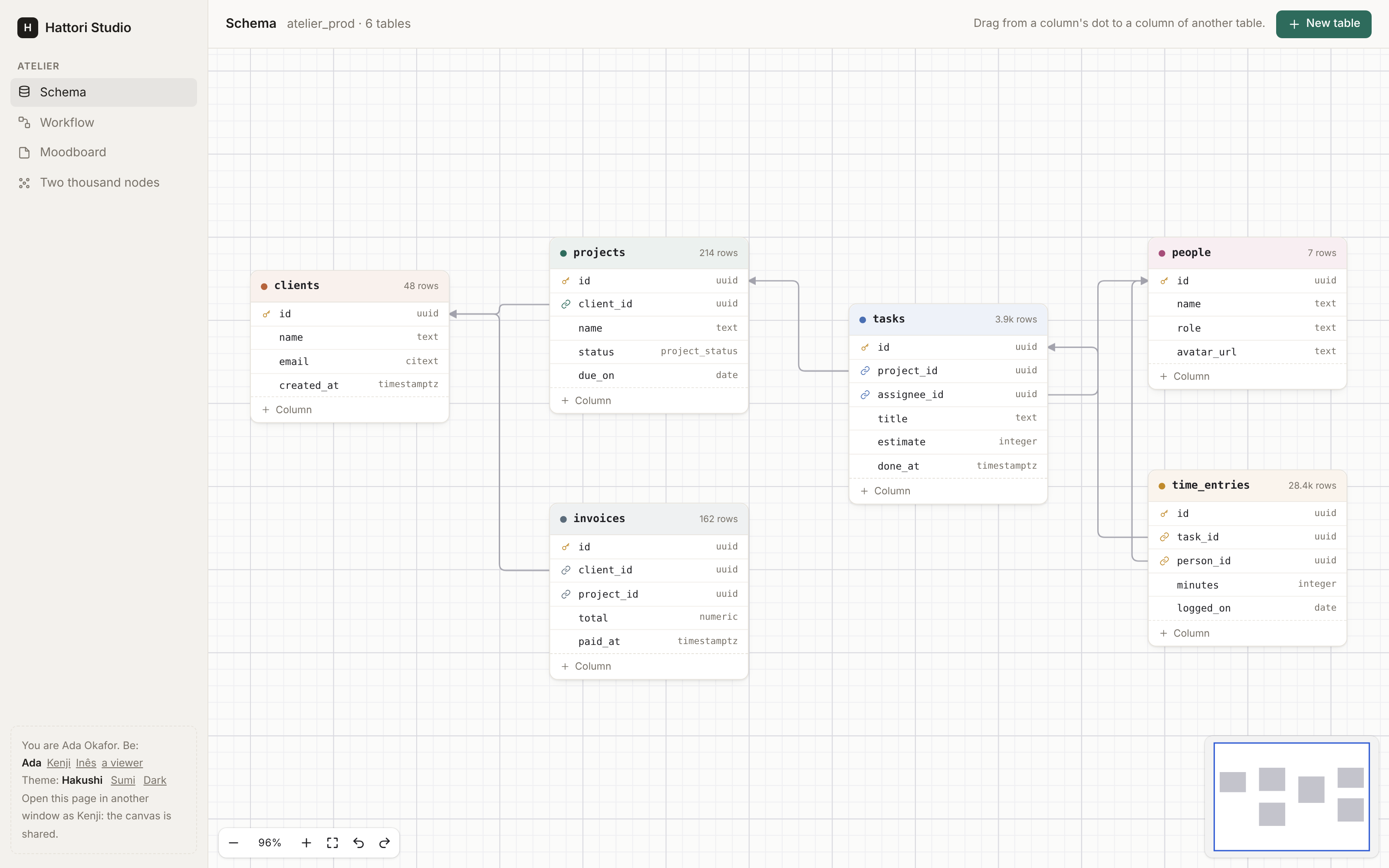
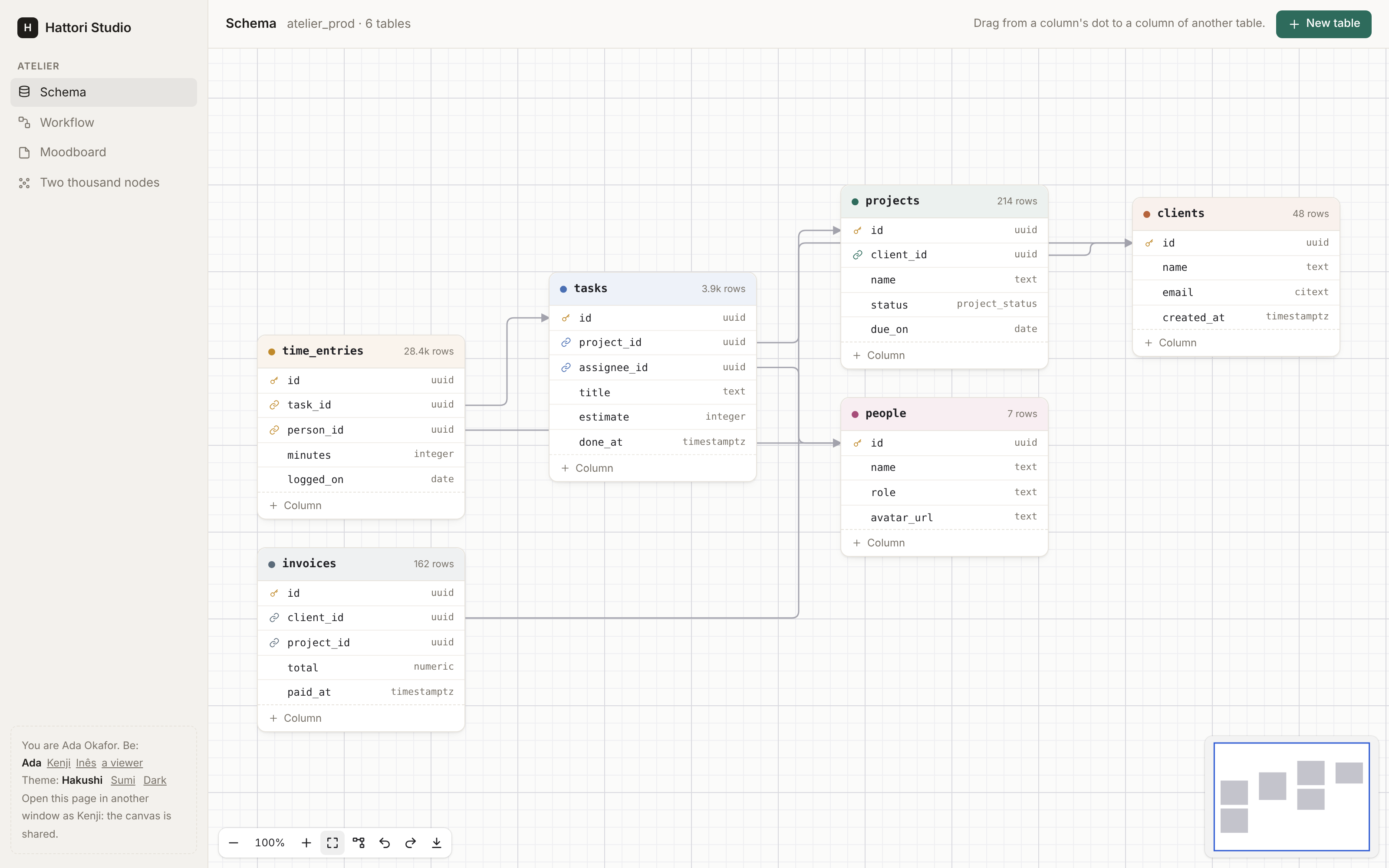
The development app of this repository is a small project tool ("Atelier") with four canvases built on Hakushi:
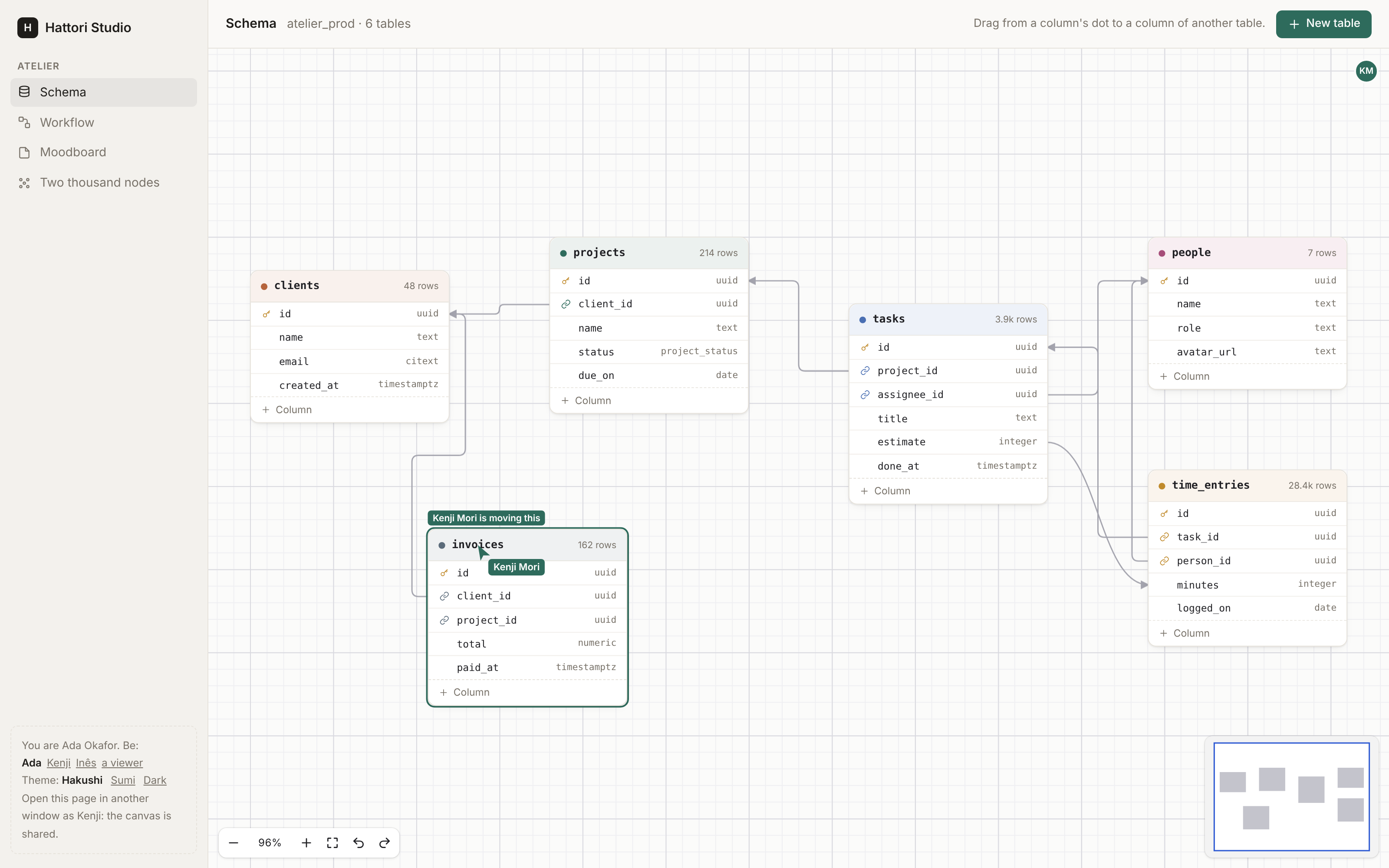
- Schema: the tables of its database on graph paper. Each column has a handle on each side; a foreign key joins a column to a column of the same type, which is all the browser offers while you draw one, and all the server takes.
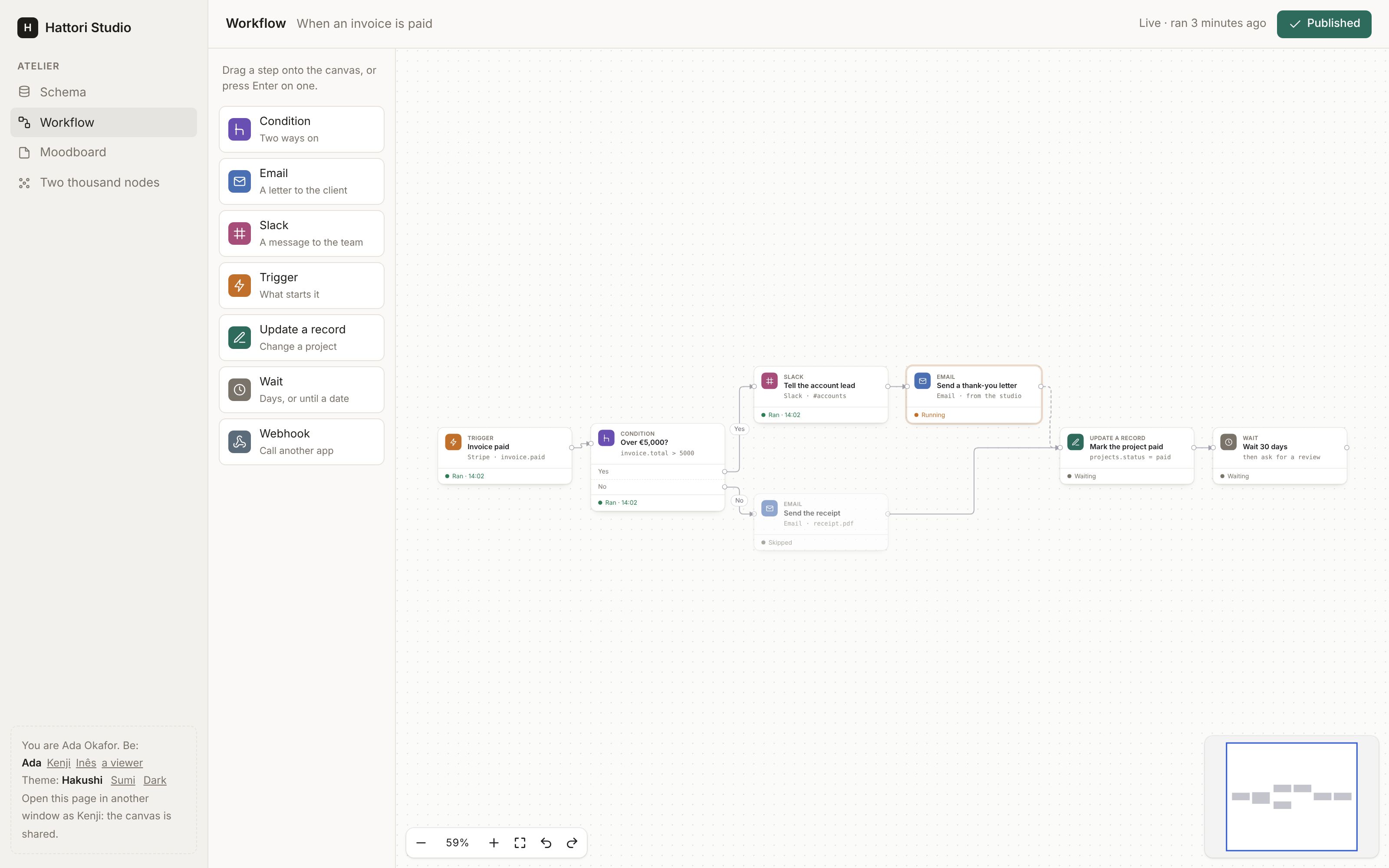
- Workflow: an automation, with a palette of steps to drag on, a condition with two ways out, and no cycles.
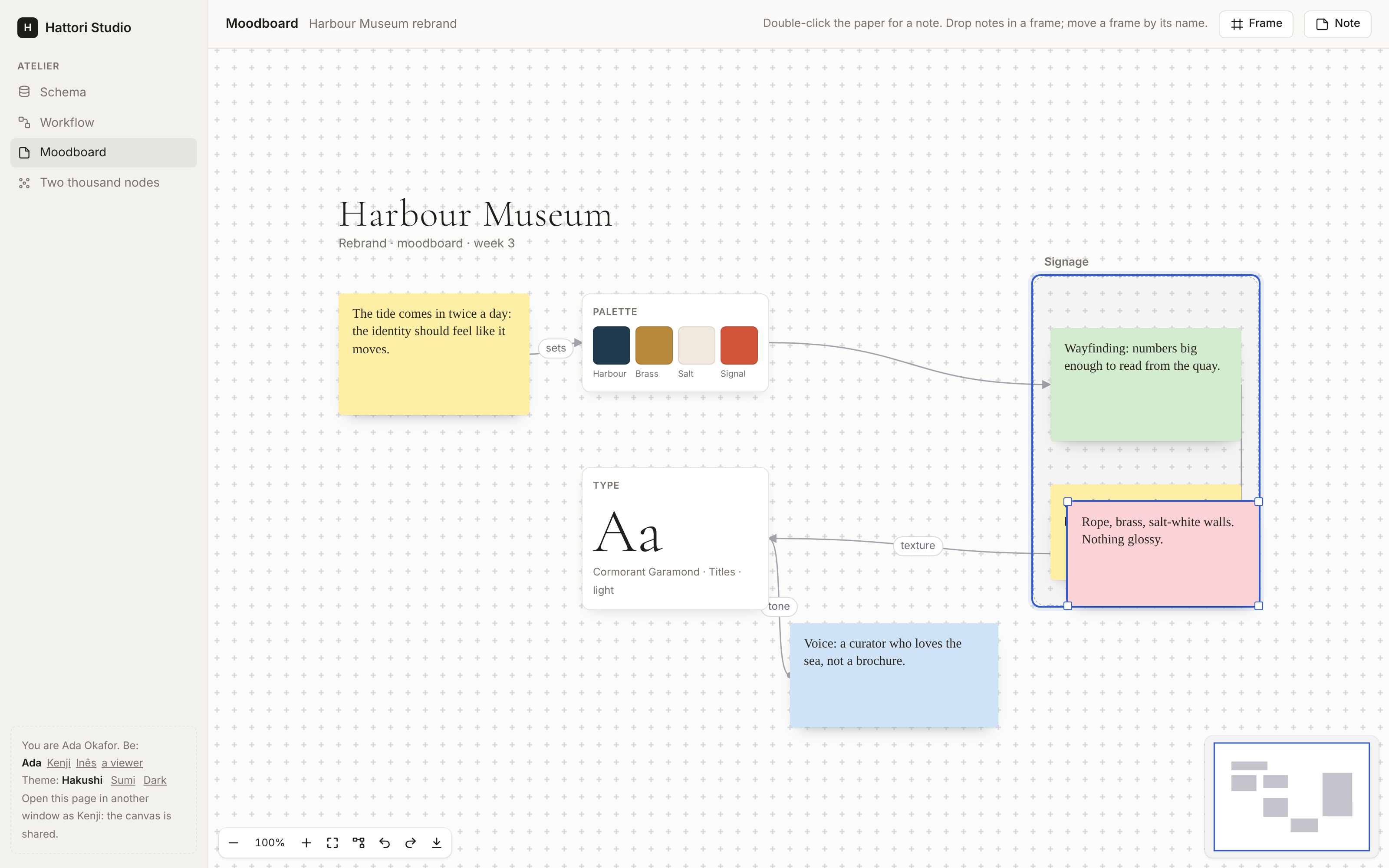
- Moodboard: notes that resize and snap to the grid, a frame that holds notes, swatches, a type specimen and labelled arrows.
- Two thousand nodes, or
?n=10000.
Run mix setup and mix dev, open http://localhost:4099, and open the
same page in a second window as Kenji (the panel at the bottom left):
the schema and the workflow are shared.
What the canvas does
| Paper | dots, lines (graph paper, with a stronger line every five squares), crosses, or none; the size of a square; snap to the grid |
| View | pan with the wheel or a trackpad, Space and a drag, the middle button, one finger; zoom with ⌘ or Ctrl and the wheel, a pinch, the controls, + and -; fit (⇧1), 100% (⇧0); an overview (minimap) to click and drag |
| Nodes | your own HEEx, a :node slot for each type; drawn from the node's data, on the server; locked nodes; resized by their corners (resizable); a part of a node to drag it by (data-hakushi-drag), and fields and buttons in it that are theirs |
| Handles | sources, targets or both, on any side of the node or of any element in it (a row of a table); several with one id, of which an edge takes the nearest; type, accepts and max |
| Edges | bezier, smooth, step, straight; an arrow, a dot or no end; a label, set with a double click; animated; selected and deleted |
| Drawing | from a handle to a handle, the handles it may end on shown; from a target backwards; dropped on a node, to its nearest valid handle; the end of a selected edge dragged to another handle |
| Groups | nodes of a group slot hold others (parent): a drop on one puts a node in it, a drag off takes it out; its nodes move, are copied and go with it; groups in groups; a box drawn inside a group selects in it |
| Layout | a tidy up (⇧L, the controls, Hakushi.Live.layout/2): layers from left to right or top to bottom, fewer crossings, each node level with its neighbours, the parts of a graph apart; of the selection or of every node; animated; one change |
| Export | the whole canvas as a PNG or an SVG, the nodes as the page draws them (the controls, Hakushi.Live.export/2, exportImage()) |
| Selection | a click, Shift or ⌘ and a click, a box on the paper, ⌘A, Escape |
| Moving | a drag, of every selected node; helper lines that line a node up with the others (Alt to drag freely); the arrow keys, Shift for ten |
| Changes | moves, resizes, edges, deletes (with their edges), labels, copy and paste, duplicate, items dragged from outside the canvas (canvas_item/1) or a double click on the paper (new_node); undo and redo of each person's own changes, checked again |
| Server | on_change for each change, with the graph before and after it and the person; the rules (loops, duplicates, cycles); a refused change taken back, its reason shown; the app's own changes (Hakushi.Live.change/2, Hakushi.Issho.change/3) |
| Shared | live={{issho, topic}}, on Issho: one room for each canvas (in a cluster too), your policy asked for every change, changes in one order for everyone, the people with their avatars, cursors, selections and drags in their colours |
| Keyboard | Tab and Shift+Tab from node to node, Alt and an arrow to the nearest node that way, Enter into a node's fields and Escape out, C to connect with the arrows and Enter |
| Screen readers | the canvas, its nodes and their connections, named; the moves, selections, connections and refusals said in a live region |
| Scale | nodes and edges sent as LiveView streams: a change sends what it touches; the nodes and edges far from the screen are not laid out or painted |
| Storage | Hakushi.Graph.Type, a whole canvas in one column (jsonb); or your own tables, with on_change |
| Theming | CSS custom properties, the Sumi theme, dark mode, forced colours, reduced motion |
| Words | the canvas's own words in English, Portuguese, Spanish, French, German and Japanese |
Install
Hakushi needs Elixir 1.18 or later (it uses the built-in JSON
module), Phoenix 1.7.14 or 1.8, and Phoenix LiveView 1.1 or later.
Add hakushi to the deps in mix.exs:
def deps do
  [
    {:hakushi, "~> 0.1"}
  ]
end
Then run:
mix deps.get
mix hakushi.install
The installer adds the hook to assets/js/app.js and the style sheet to
assets/css/app.css, and prints what it changed. Give --dry-run to see
the changes first. It does not add what a file already has, so you can
run it again.
The manual steps
To make the same changes by hand, import the hook in assets/js/app.js
and add it to the hooks of the LiveSocket:
import { Hakushi } from "hakushi"

const liveSocket = new LiveSocket("/live", Socket, {
  params: {_csrf_token: csrfToken},
  hooks: {...colocatedHooks, Hakushi},
})
Import the style sheet in assets/css/app.css (and the Sumi theme, if
you want it: Sumi is the design system of Hattori AI, the makers of
Hakushi, Masu, Kotoba, Koyomi and Jumon), below the other @import lines:
@import "../../deps/hakushi/priv/static/hakushi.css";
/* @import "../../deps/hakushi/priv/static/hakushi-sumi.css"; */
import { Hakushi } from "hakushi" resolves through the NODE_PATH of
your esbuild profile, which must have deps/, as the Phoenix generators
set it.
Use
<.canvas id="flow" graph={@graph} on_change={&Flows.change(&1, &2, @flow)} class="h-[40rem]">
  <:node type="step" :let={node}>
    <div class="step">
      <.handle kind={:target} side={:left} />
      {node.data.title}
      <.handle kind={:source} side={:right} />
    </div>
  </:node>
</.canvas>
Import the components in the html_helpers of your web module:
import Hakushi.ComponentsA graph is nodes and edges:
graph =
  Hakushi.Graph.new(
    nodes: [
      %{id: "a", type: "step", x: 0, y: 0, data: %{title: "Invoice paid"}},
      %{id: "b", type: "step", x: 300, y: 0, data: %{title: "Send a receipt"}}
    ],
    edges: [%{source: "a", target: "b"}]
  )
And on_change is where you check each change and save it:
def change(%Hakushi.Change{} = change, %{result: graph, user: user}, flow) do
  if Flows.can_edit?(flow, user),
    do: Flows.save_graph(flow, graph),
    else: {:error, "You can look at this flow, not change it."}
end
Give the canvas a height: it fills the box you give it.
Guides
- Quickstart: install, a canvas, saving it.
- Nodes: slots, handles, sizes, a part to drag by.
- Edges: paths, ends, labels, and the rules of what connects to what.
- Groups: frames that hold nodes.
- Layout and export: the tidy up, and the canvas as an image.
- Changes:
on_change, refusals, the app's own changes, undo, storage. - Collaboration: a shared canvas, rooms, people, a cluster.
- Navigation: the pointer, the trackpad, touch and the keyboard.
- Testing:
Hakushi.Test. - Theming: the
--hakushi-*properties, the Sumi theme, dark mode. - Accessibility and Known limits.
Development
mix setup        # deps, and the npm packages of assets/ and e2e/
mix dev          # the development app at http://localhost:4099
mix test         # the Elixir tests
mix test.js      # the unit tests of the TypeScript modules
mix test.e2e     # the browser tests (Playwright) against the development app
mix dev builds the bundle when it is missing, and again on a change.
See CONTRIBUTING.md for what a pull request needs, and report a security problem
privately, as SECURITY.md says.
License
Hakushi is released under the MIT License. See LICENSE.